

Overview
Skill Verification enables candidates to earn trusted, verifiable skill badges by proving their expertise through either:- Human Endorsement
- Assessment Verification
Verification Methods
Candidates can verify skills using two methods:1. Human Endorsement
A professional contact validates the candidate’s skill based on actual working experience. Examples:- Reporting Manager
- Functional / Technical Lead
- Client / Stakeholder
- Founder / CXO
- Peer / Colleague
Key Rules
- Up to 5 skills can be bundled in a single endorsement request.
- Only official company email addresses are accepted.
- Personal email addresses such as Gmail, Yahoo, Outlook, etc. are not allowed.
- One source must be selected during verification.
- The verifier receives a secure verification request.
- Skills become verified once approved by the verifier.
2. Assessment Verification
Candidates can verify a skill by successfully completing an AI-generated assessment. The assessment is dynamically generated based on the selected skill and source.Key Rules
- Only 1 skill can be assessed at a time.
- Assessment questions are generated from:
- Work Experience
- Projects
- Certifications
- Other Activities
- Candidates must achieve the required passing score.
- Verified skills are automatically added to the Skill Repository.
Skill Verification Flow
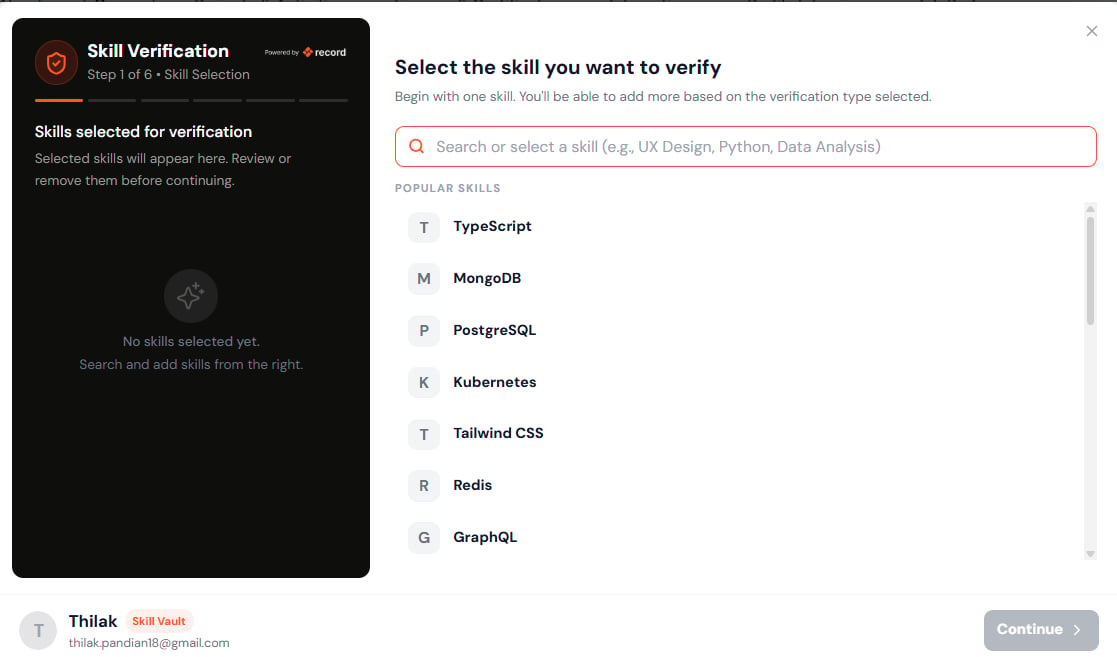
Step 1 — Select Skill
The candidate starts by selecting the skill they want to verify. Examples:- TypeScript
- Data Analysis
- Kubernetes
- Python
- UX Design
Notes
- Verification begins with one skill.
- Additional skills can be bundled later depending on the verification method.
- The selected skill becomes the primary skill for verification.
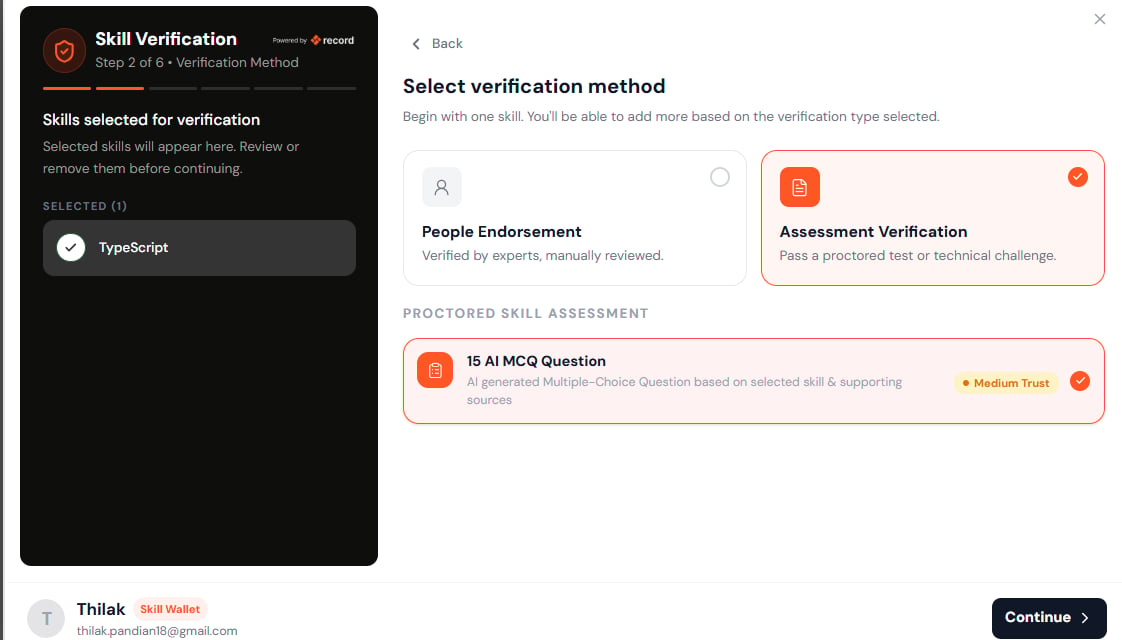
Step 2 — Select Verification Method
The candidate chooses how they want to verify the skill.Human Endorsement
Verified by a professional contact.Assessment Verification
Verified through a structured assessment.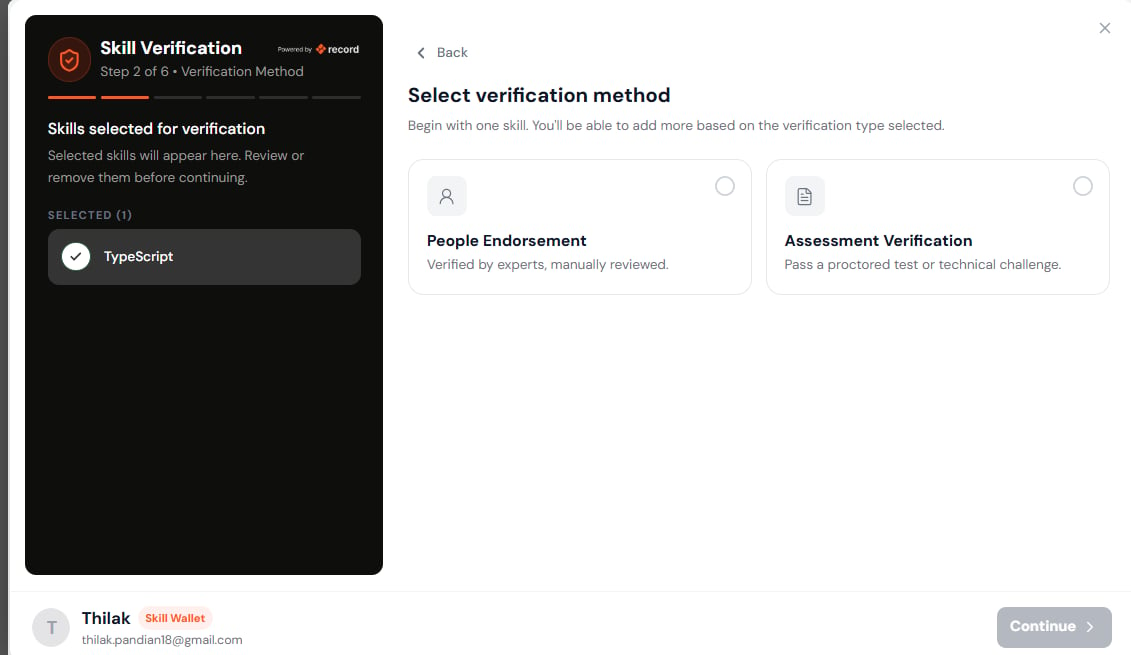
Human Endorsement Flow
Step 3 — Select Endorsement Type
Candidates select the relationship of the person verifying the skill.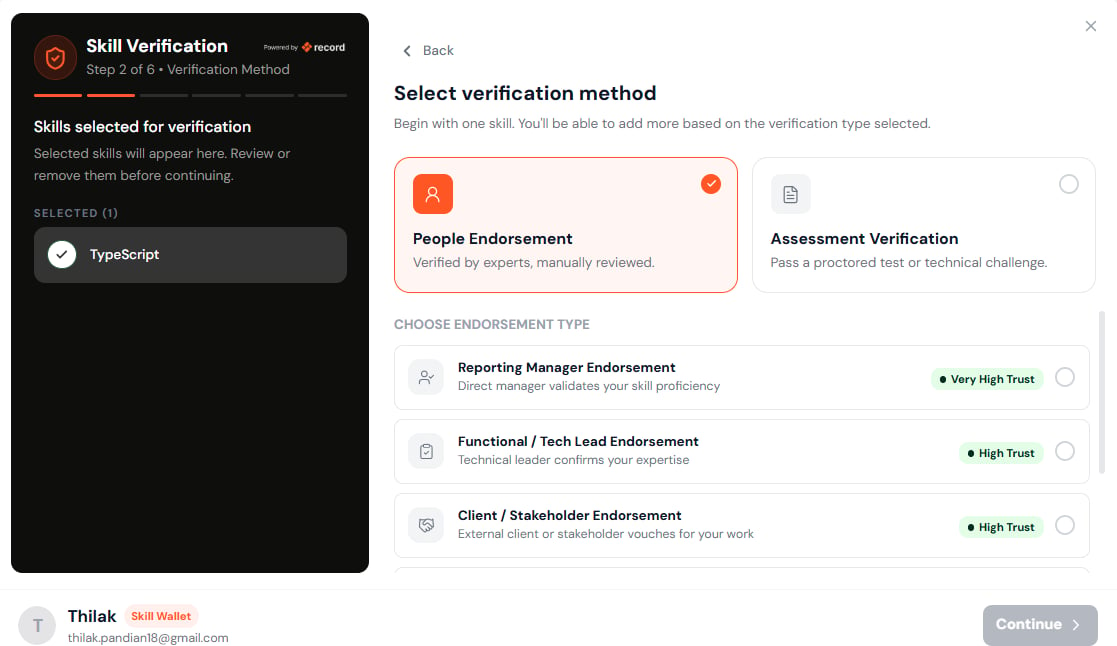
Available Endorsement Types
Reporting Manager Endorsement
Direct manager validates skill proficiency. Trust Level: Very HighFunctional / Technical Lead Endorsement
Technical leader validates expertise. Trust Level: HighClient / Stakeholder Endorsement
Client validates delivery and work quality. Trust Level: HighFounder / CXO Endorsement
Business leader validates contributions. Trust Level: HighPeer / Colleague Endorsement
Coworker validates collaboration and execution. Trust Level: MediumTrust Levels
Different endorsement relationships contribute different trust signals.
Higher trust endorsements contribute stronger verification credibility.
Step 4 — Select Verification Source
The candidate selects the source where the skill was demonstrated. Only one source can be selected per verification request.Available Sources
Work Experience
Skills demonstrated during employment.Projects
Skills demonstrated while building projects.Certifications
Skills supported through certifications.Other Activities
Skills demonstrated through extracurricular or professional activities.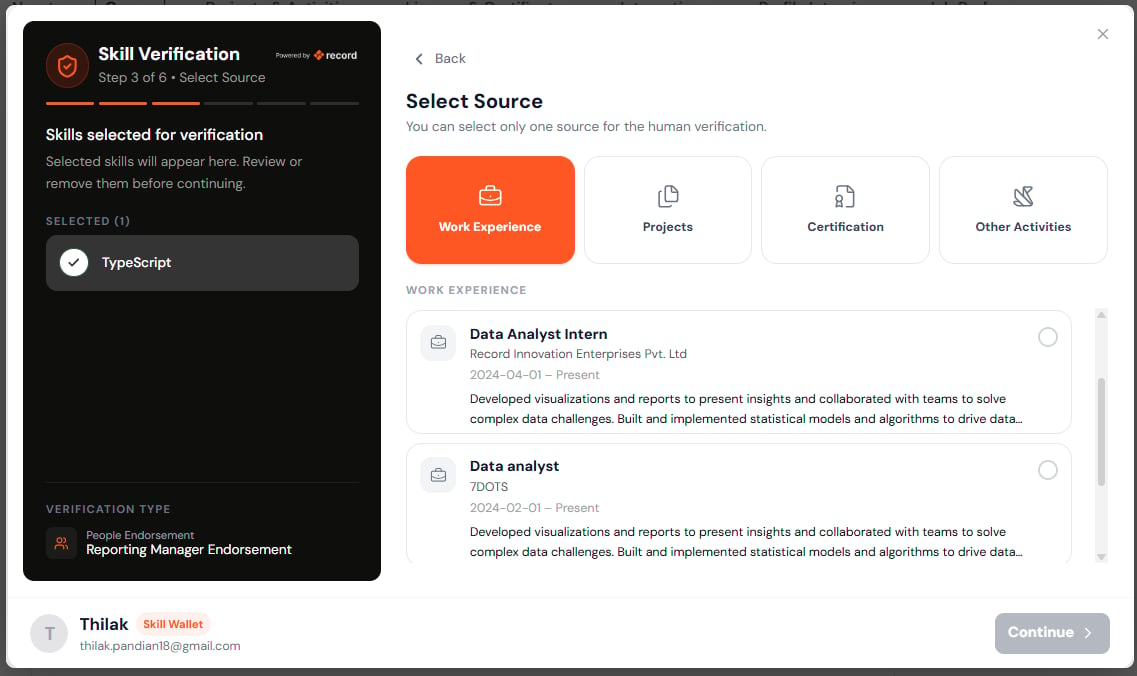
Step 5 — Add Verifier Information
The candidate provides details of the verifier.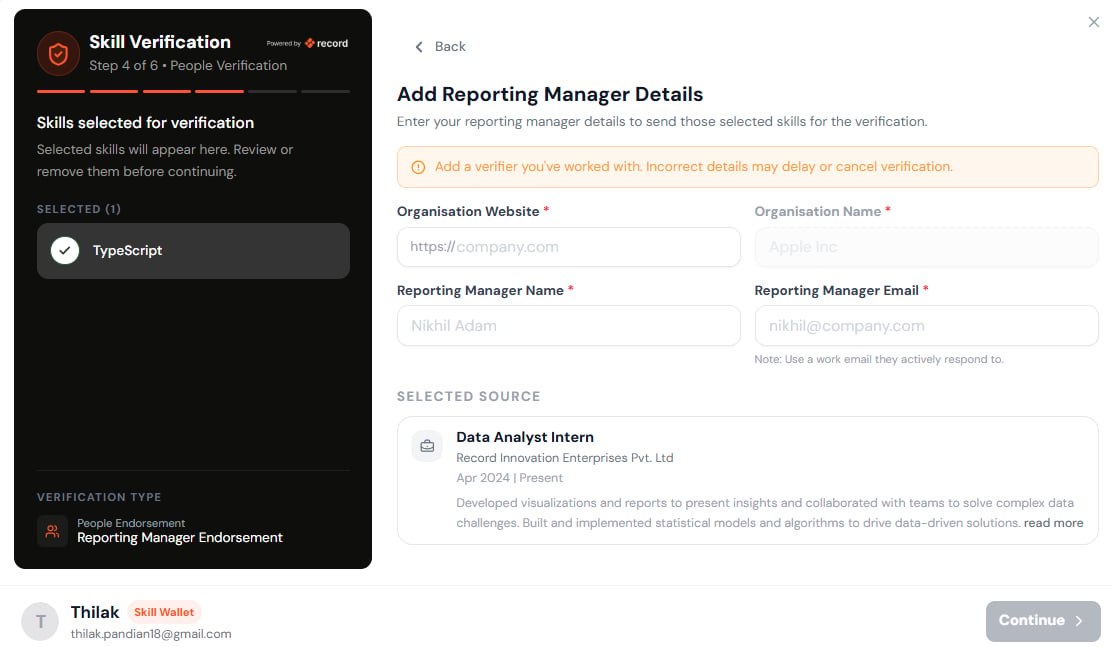
Required Information
Organization Website
Example:Organization Name
Example:Verifier Name
Example:Official Work Email
Example:Important
- Only business email addresses are accepted.
- Email domain validation is performed.
- Verification requests sent to invalid domains may be rejected.
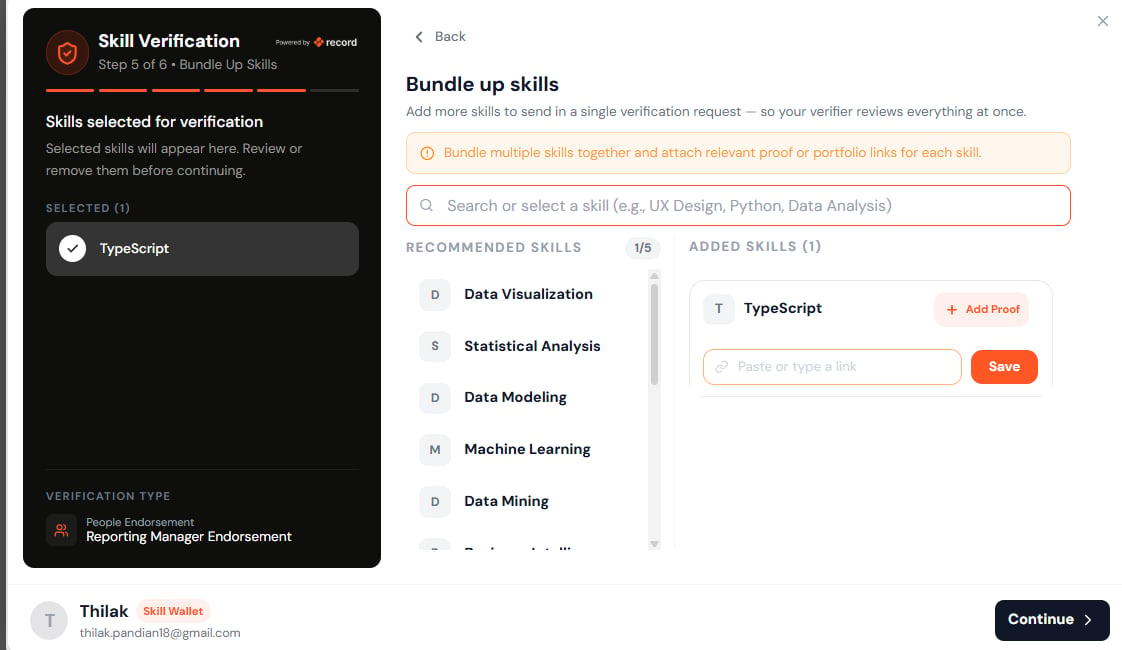
Step 6 — Bundle Additional Skills
Human endorsement allows candidates to verify multiple skills together.Bundle Rules
- Maximum 5 skills per endorsement request.
- All bundled skills must relate to the selected source.
- Each skill may include supporting proof.
Examples
For a Work Experience source:- TypeScript
- JavaScript
- React
- Node.js
- API Development
Step 7 — Review & Submit
Candidates review:Endorser Information
- Name
- Company
- Relationship
Selected Source
- Work Experience
- Project
- Certification
- Activity
Selected Skills
All bundled skills are displayed. Once submitted:- Verification request is generated.
- Email is sent to the verifier.
- Request status becomes Pending.
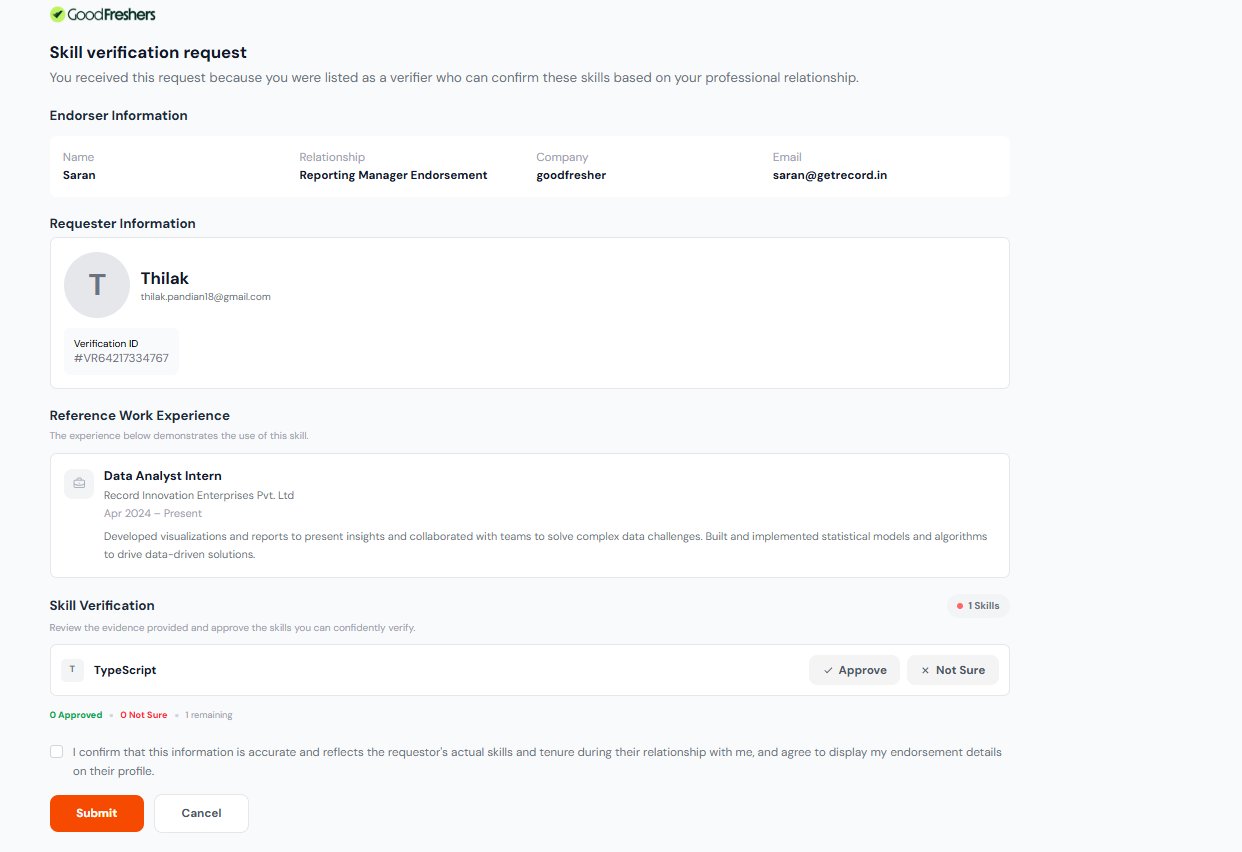
Verifier Experience
The verifier receives a secure verification link. The verifier can review:Candidate Information
- Name
- Verification ID
Reference Source
- Work Experience
- Project
- Certification
Skills Requested
Each skill can be:- Approved
- Not Sure
Final Confirmation
Verifier confirms:“The information accurately reflects the candidate’s skills and experience.”Once submitted:
- Approved skills become verified.
- Touchpoints are added to the skill record.
- Trust score is updated.
Assessment Verification Flow
Step 3 — Select Source
The candidate chooses the source associated with the skill. Example:Work Experience
Data Analyst Intern orProject
Inventory Management SystemStep 4 — Assessment Generation
The platform generates a contextual assessment using:- Selected Skill
- Selected Source
- Candidate Experience
- Supporting Metadata
- Practical Knowledge
- Decision Making
- Real-World Experience
- Problem Solving
Assessment Outcomes
Pass
Skill becomes verified.Fail
Candidate may retry based on retry policy.Paused
Candidate can resume later.Verification Touchpoints
Touchpoints represent independent verification proofs accumulated against a skill. A skill becomes stronger as additional touchpoints are added.Available Verification Proofs
Each skill can accumulate up to 6 independent proofs.Human Endorsement Proofs
- Reporting Manager
- Functional / Tech Lead
- Client
- Founder / CXO
- Peer
Assessment Proof
- Assessment Verification
Maximum Verification Capacity
Per Source
- Maximum 10 unique skills
Per Skill
- Maximum 6 proofs
Maximum Touchpoints Per Source
Skill Repository
All verified and in-progress skills are stored in the Skill Repository. The repository provides a complete history of verification activity.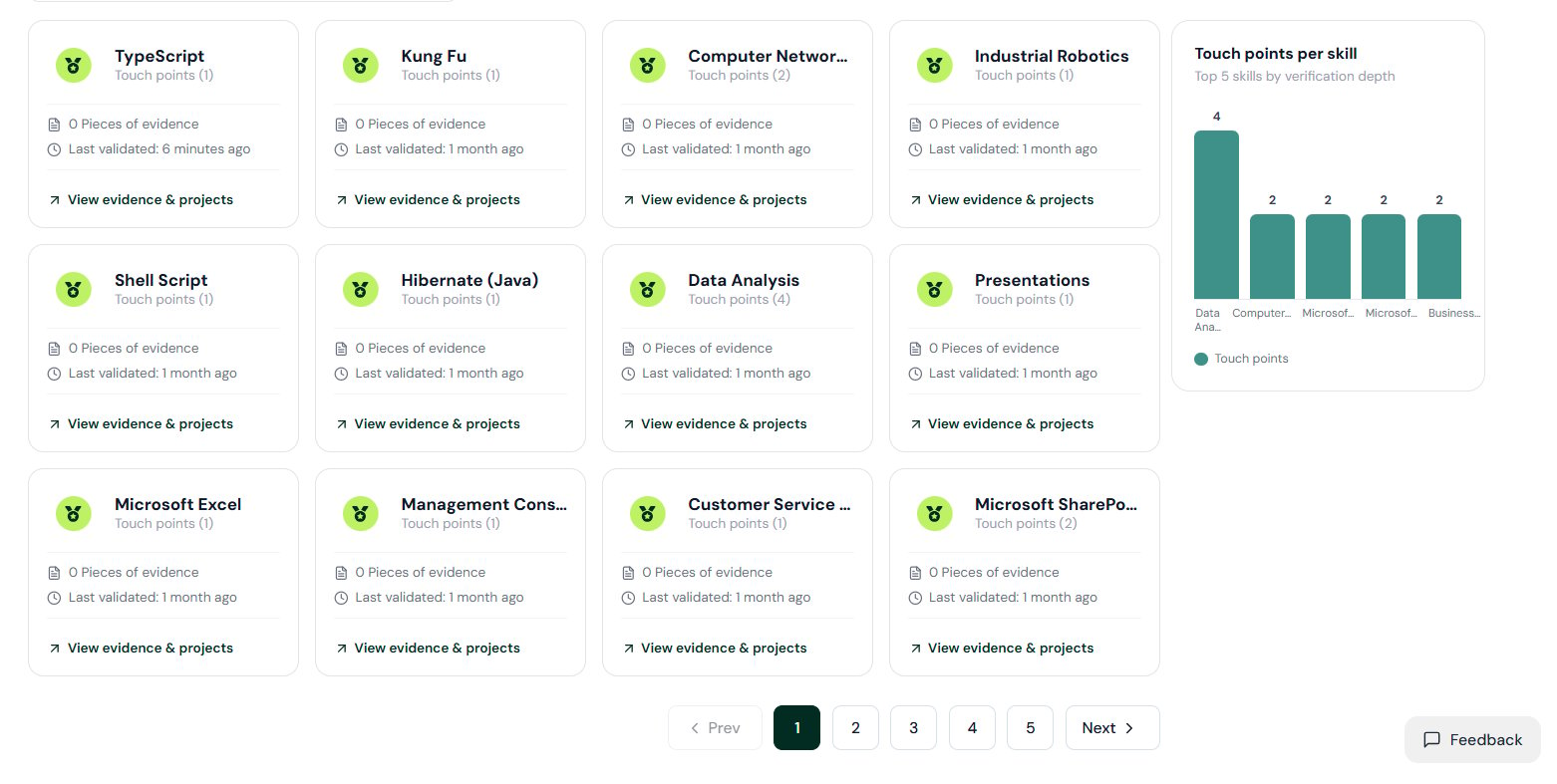
Skill Statuses
Verified
Skill has received successful verification.In Progress
Verification request has been sent and is awaiting completion.Pending Review
Awaiting human verifier response.Assessment Pending
Assessment has not yet been completed.Failed
Assessment completed but passing score not achieved.Expired
Verification validity period has ended.Information Stored
Each skill record contains:Skill Details
- Skill Name
- Verification Status
- Trust Level
Verification Details
- Verification Method
- Verification Date
- Verification ID
Touchpoints
- Number of proofs
- Endorsement history
- Assessment history
Sources
- Work Experience
- Projects
- Certifications
- Activities
Evidence
- Portfolio Links
- Supporting Documents
- Uploaded Proofs
Activity History
- Verification Requests
- Approvals
- Rejections
- Assessment Attempts
YouTube Learning Verification
Transform your self-learning into verified, recruiter-recognized skills. The YouTube Learning Verification feature allows candidates to earn skill badges by completing educational content and successfully demonstrating their knowledge through an assessment. Skills earned through this method are added directly to the Skill Repository, alongside other verified skills earned through endorsements and assessments. Each verified skill includes verification metadata, learning history, assessment outcomes, and trust signals that help recruiters understand how the skill was earned. Candidates can also receive a Certificate of Completion, providing tangible proof of their learning journey. This enables learners to convert educational YouTube content into credible, shareable professional achievements while building a stronger and more discoverable skill profile.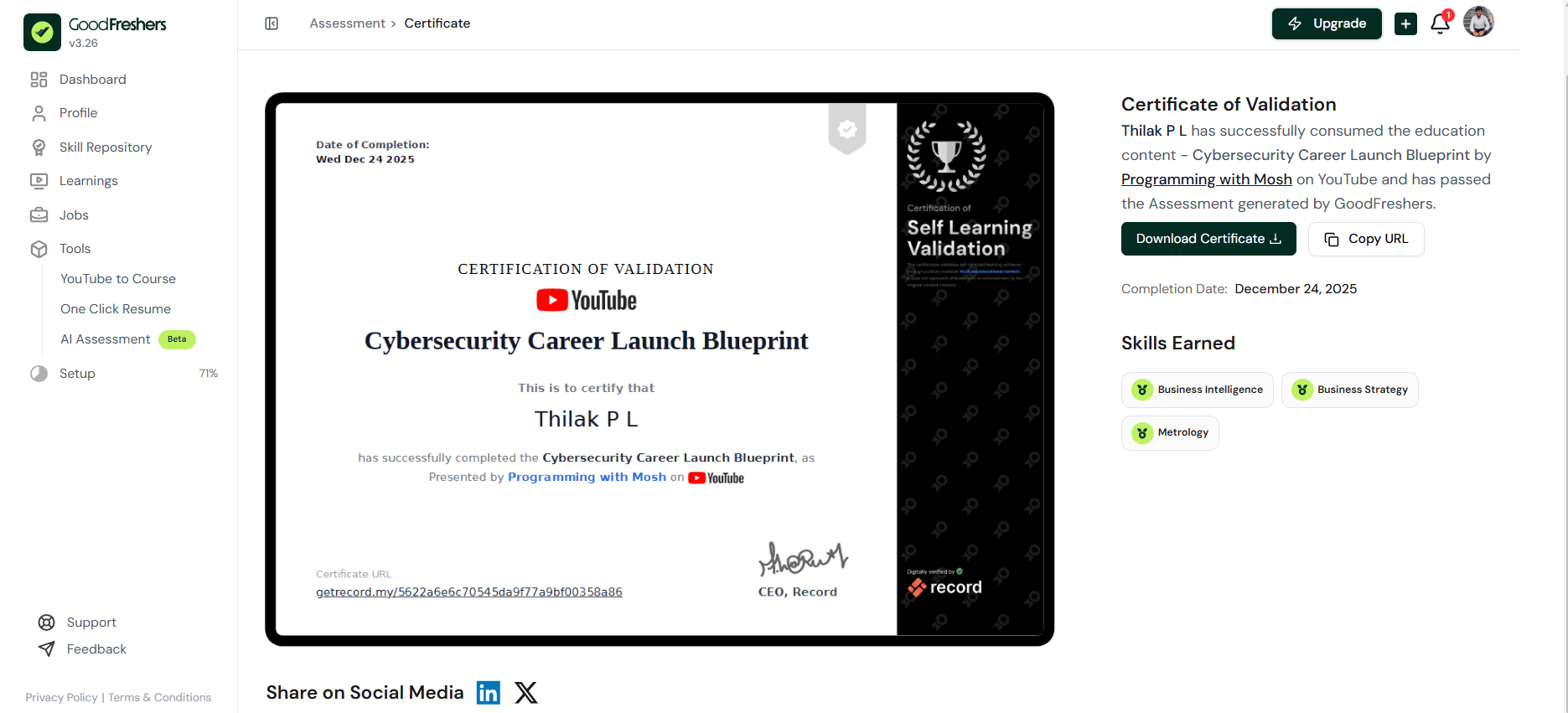
Edge Cases & Validation Rules
Human Endorsement Rules
Assessment Rules
Benefits of Skill Verification
For Candidates
- Earn trusted skill badges
- Improve recruiter visibility
- Demonstrate real-world expertise
- Build a stronger professional profile
- Create a verifiable skill portfolio
For Recruiters
- Validate candidate claims
- Reduce hiring risk
- View trust levels and touchpoints
- Access verification history
- Evaluate skills with confidence